Overview
My Role
Lead Product Designer, Researcher
Timeline
Oct. 2024 - Dec. 2024
Team
Joanna Rivera, Chloe Ladines, Elizabeth Page, Amanda Kavan, Alison Baldwin
Tools
Figma, Miro
Problem
Patients often leave medical appointments with lingering questions about their diagnoses, treatment plans, and next steps. Where can patients turn for accurate, timely information without adding to the burden of busy healthcare professionals? This disconnect leaves patients feeling unsupported and providers stretched thin, highlighting the need for a solution that bridges this gap.
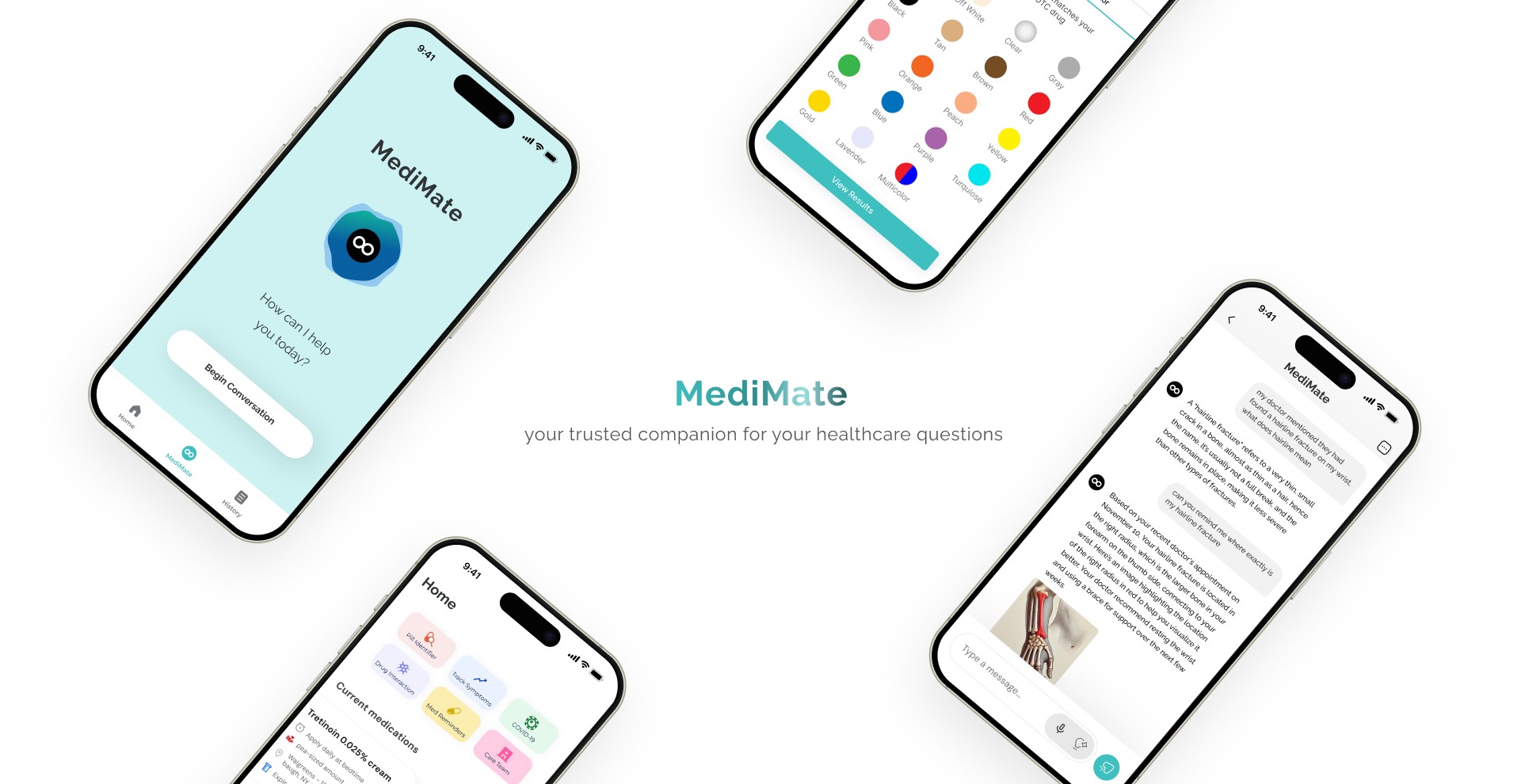
We designed MediMate, an EHR-integrated AI-powered chatbot that delivers personalized medical responses based on the patient’s health records and the hospitals database. It also enables users to quickly see their medication list, identify their pills, view their medical team, and more. MediMate transforms the post-appointment experience into one of clarity, support, and confidence for all.
Solution
MediMate
your trusted companion for your healthcare
Patients often leave medical appointments with unanswered questions, feeling unsupported and disconnected from their care. Existing solutions like MyChart provide limited, slow responses, while healthcare professionals face burnout due to excessive workloads and administrative demands.
MediMate addresses these challenges by providing an AI-powered chatbot that bridges the gap between patients and providers. It offers personalized medical information, medication reminders, and actionable next steps, reducing provider workload and enhancing patient support. By integrating seamlessly with EHR systems, MediMate transforms post-appointment care into a more accessible and effective experience for all.
This project was developed as part of the Topics in Computer Science I: Health Care Information Systems course, where the focus was on leveraging technology to address critical challenges in the healthcare industry. MediMate reflects a collaborative effort to explore innovative solutions for improving patient outcomes and supporting healthcare providers.
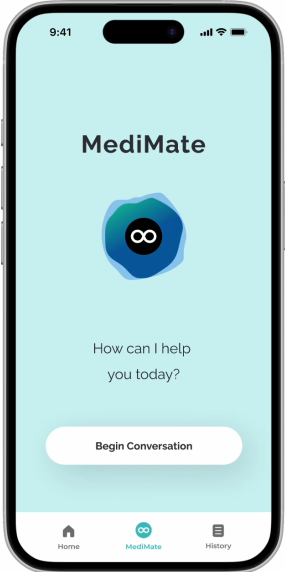
MediMate
How can I help
you today?
Home
MediMate
History
Begin Conversation
Home
Pill Identifier
Track Symptoms
COVID-19
Drug Interaction
Med Reminders
Care Team
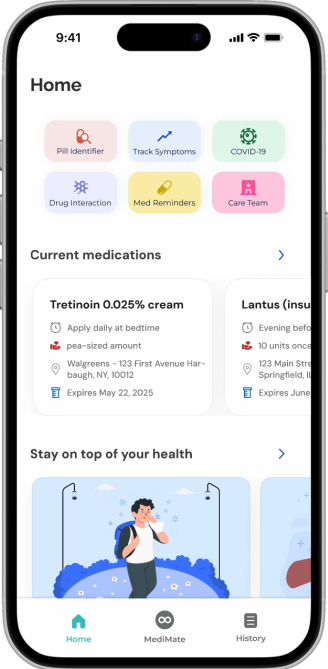
Current medications
Tretinoin 0.025% cream
Apply daily at bedtime
pea-sized amount
Walgreens - 123 First Avenue Har-
baugh, NY, 10012
Expires May 22, 2025
Lantus (insulin glargine)
Evening before bedtime
10 units once daily
123 Main Street
Springfield, IL 62701
Expires June 30, 2025
Stay on top of your health

Seasonal Allergies or COVID-19
Learn to differentiate your current symptoms

Why Age and Alcohol Don’t Mix
Why your body no longer handles alcohol the way it once did, along with the latest health advisories.
How to remain safe in winter weather
Freezing temperatures and icy winds can present specific dangers for older adults.

How to Keep your Blood Pressure from Spiking
Adopt these 10 lifestyle changes to lower blood pressure and reduce heart disease risk.

Home
MediMate
History
Today
How long after do i feel symptoms from my medi...
Yesterday
Is it possible that I’m eligible for financial assistan...
Wed, 7 Nov
What were the exact steps that my doctor recom...
Mon, 22 Oct
I don’t understand some of the terminology that...
Fri, 1 Oct
How do I access my health records from mychar...
Wed 29 Sept
I’d like to know what the billing for my recent app...
Sun, 5 Sept
I went to visit my doctor on the first of September...
History
Search ...
Chats
Archived
Images
Exports
Home
MediMate
History
Healthcare Details at a Glance
All the health information you need at one place
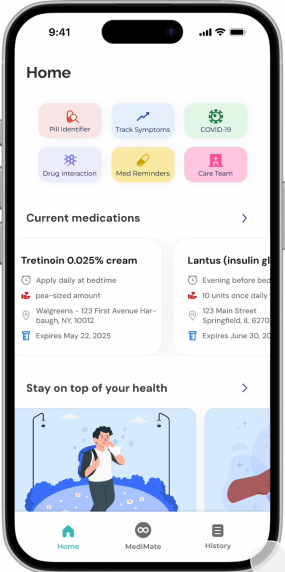
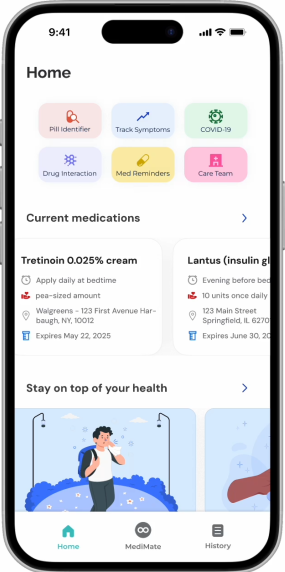
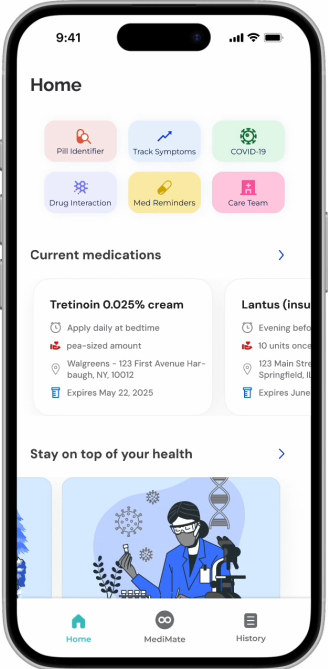
The MediMate home page is your central hub for managing all your healthcare needs. From identifying pills and tracking symptoms to checking drug interactions and setting medication reminders, every feature is designed with you in mind. Quickly connect with your care team, access your current medications, and explore health-related articles to stay informed and in control.
Store your Conversations in One Space
Briefly view your past conversations
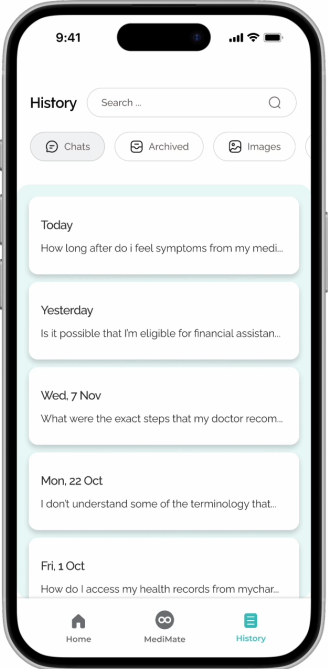
The MediMate history page keeps track of your past interactions, from previous chatbot conversations to archived conversations and images. Easily revisit details about conditions, medications, or advice you’ve received, ensuring that your healthcare journey remains organized and accessible whenever you need it.
AI-powered Conversations to Answer your health questions
Real-time assistance with MediMate’s chatbot
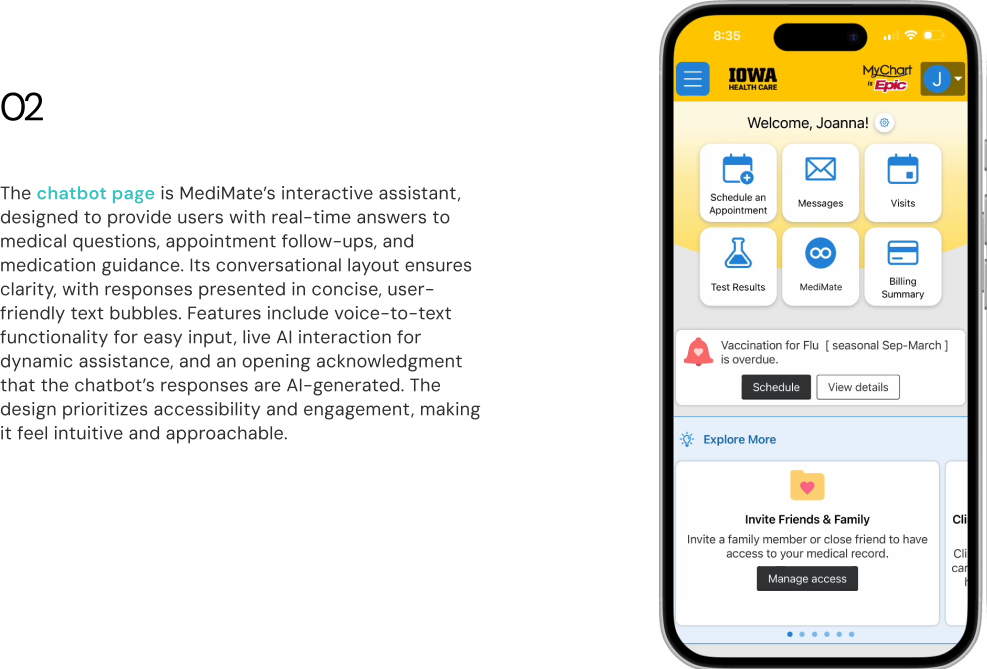
Ask questions about your medications, conditions, or symptoms, and receive accurate, easy-to-understand guidance. Whether you need a detailed explanation or a quick reminder of your recent appointment, MediMate ensures you’re never without the help you need.
The Journey
From an idea to an application in 3 months
01 Getting the right idea
Research & Brainstorm
Our team conducted extensive research on healthcare challenges, focusing on provider burnout and patient engagement gaps. To validate our ideas, we surveyed and interviewed 10 participants—8 patients and 2 healthcare professionals—gaining valuable insights into their pain points and expectations.
02 Communicating through design
Design & User Testing
I designed all low & high fidelity wireframes, performed user testing on them and iterated. A design system was also created for better consistency and easier development process.
03 Bringing design to life
Development & Usability Testing
After completing the chatbot prototype, we conducted rigorous usability testing with our participants. Their feedback helped us identify and resolve any remaining issues, ensuring MediMate delivers a seamless and intuitive user experience.
04 Packaging the product
Deployment & Pitch
One final key component of the project is the prototype demo and the pitch, which explained what the application does, the values, and our process. We weren't just making an app, we were building a product. So this includes finding the product market fit, value proposition, and how we differentiate ourselves.
The Research Pipeline
Research
Secondary Research
Conducted competitive analysis on the top
grossing healthcare apps in the market.
User Interviews
Gathered insights from 10 individuals
ranging from 18-65 years of age
Design Requirements
Established both functional and non-functional requirements for the design



Competitive Analysis
Before surveying users, We wanted to see what is currently on the healthcare AI market such as Ada Health, Evidently, and Buoy Health. What’s working? What is not? While these platforms provide valuable features, MediMate sets itself apart by addressing gaps in post-appointment care and delivering a more comprehensive, and direct patient-centered experience. Our team conducted a brief competitive analysis to see what demands each app meets.


Therefore I want to create an application that is EHR-integrated and provides a post-appointment support system that not only informs but empowers patients while alleviating provider workload.
From the analysis, we learned that:
Apps like Ada Health provides concise health insights and symptom assessments, but falls short in specific questions related to their recent appointments, medications, or the necessary steps to take once they are no longer at the healthcare facility.
Buoy excels at providing in-depth resources in their articles, including video examples, links to exact remedies, and step-by-step treatments. However, Buoy’s “chatbot” survey format lacks the conversational tone that fosters empathy. It feels more like a quiz than a natural chat, which reduces user trust.
Evidently’s AI-powered tool aims to reduce clinician burden and improve patient care by streamlining chart review and providing a comprehensive overview of patient data. However, Evidently's focus on clinician-facing features may limit its scope to patient engagement and support.
Talking to Target Users
To better understand how patients and care providers currently communicate information regarding post-appointments and identify potential problems, I advocated for conducting user interviews first before diving into solutions. Afterwards, the team and I participated in affinity mapping sessions, so that as a group, we can brainstorm solutions based on our findings.
USER INTERVIEWS
We used our survey data to better inform the questions we
wanted to elaborate on in our user interviews, filling in our
gaps of our knowledge of our target user group.
We conducted 10 semi-structured interviews with healthcare portal users to understand users’ attitudes and behaviors towards:
Managing post-appointment care and follow-ups
Understanding medical information and diagnoses
Keeping track of medications and prescriptions
Communicating with healthcare providers outside of appointments
Challenges related to accessing reliable health information
How do you currently manage follow-up care or next steps after a medical appointment?
What challenges do you face when trying to understand your medical diagnosis or treatment plan?
How do you keep track of medications, including reminders and refill schedules?
What would make it easier to contact your healthcare provider after an appointment?
Organizing our Findings Through Affinity Mapping
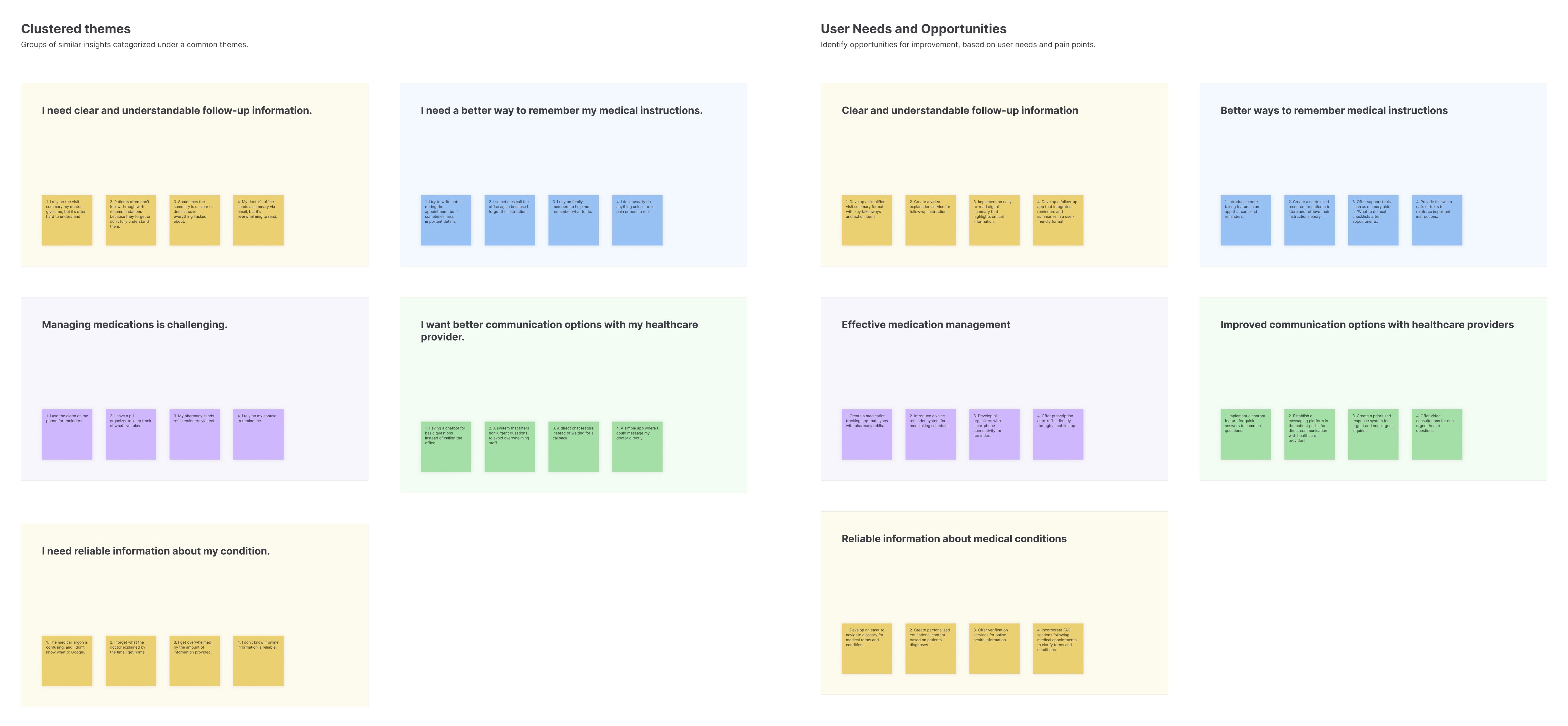
To synthesize our findings more effectively, we turned to affinity mapping. Through this process, we uncovered a central pain point: users face significant challenges in managing post-appointment care and accessing reliable healthcare information. Further analysis revealed that these challenges are driven by four key factors:
Confusion caused by unclear or overwhelming medical summaries
Difficulty understanding medical jargon and diagnoses
Lack of effective tools to track medications and reminders
Limited options for efficient communication with healthcare providers
By organizing our findings, affinity mapping allowed us to identify these recurring themes and prioritize user needs, ultimately guiding the development of MediMate’s features.
Next: What Should we Focus on?
Our team listed points to keep in mind while devising solutions to address users’ pain points.
After Days of Brainstorming, we Solidified the Design Requirements:
SOLUTIONS / FEATURES
ADDRESSES:
Clarity
Ensures patients understand their medical summary without feeling overwhelmed by complex information. It should use natural language processing to make interactions intuitive and feel conversational.
Interactive Chatbot for Real-Time Assistance
MediMate must generate clear, personalized, and easy-to-understand post-appointment summaries from the patient’s health records. In addition, it should remind users that responses are generated by AI and should contact their providers for further clarification. Summaries should avoid medical jargon and provide visual aids when applicable, like icons or images.
Efficiency
By providing instant answers to common questions, MediMate can save patients time and effort that would otherwise be spent contacting their healthcare provider or searching for information online.
Efficiency
This reduces the time and effort required for patients to manage their healthcare tasks while ensuring their data is protected.
Fast and Secure Performance
MediMate must maintain quick response times and adhere to strict HIPAA compliance for patient data security. The app should also encrypt all communication between patients and their care teams to ensure privacy.
Clarity
Having archived summaries and conversations ensures that patients can revisit and better understand their medical information without feeling rushed or overwhelmed during their appointment.
Comprehensive History Page
MediMate must include a history page that organizes past chatbot conversations, archived care summaries, and saved medical images in an easily accessible format. Users should be able to filter or search their history by date, topic, or keyword to quickly retrieve important information.
Efficiency
By providing a searchable, organized history of past interactions, MediMate reduces the time and effort patients spend retrieving information after appointments.
Centralized Healthcare Dashboard
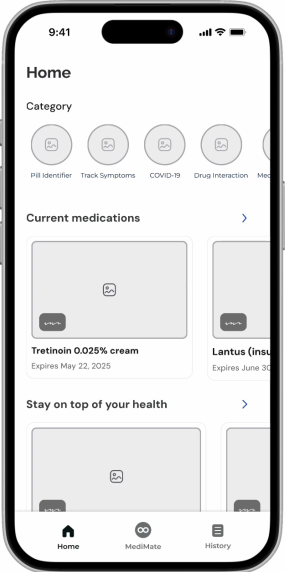
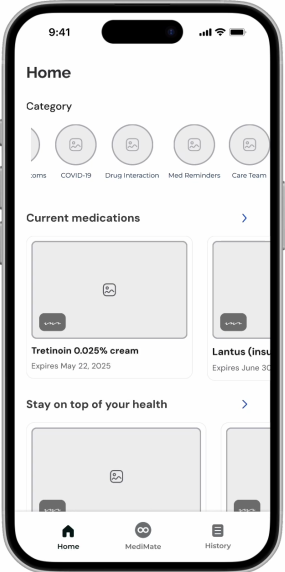
MediMate must feature a centralized home page that provides quick access to key functionalities, including a pill identifier, symptom tracker, COVID-19 updates, drug interaction checker, medication reminders, care team communication, current medications, and health-related articles.
Engagement
MediMate stands out by including features that go beyond what traditional patient portals offer. This expanded functionality empowers patients to take a more active role in their care, fostering deeper engagement with their health.
Accessibility
Ensuring that the interface remains uncluttered and easy to navigate for all users, especially those with limited technological proficiency, will be crucial.
Clarity
How can we ensure patients understand their medical summary without feeling overwhelmed?
How can we make features intuitive and easy to use for patients of all backgrounds?
Accessibility
What strategies can we use to make it easy for patients to use MediMate’s features?
Engagement
What can we do to reduce the time and effort needed for patients after their appointments?
Efficiency
Flexibility
What features can we add to make users feel unrestricted?


Defining our Target Users
To better guide our design and enable everyone on the team to empathize with our users, I further synthesized the interview results and came up with the following personas:

Paolo, the Concerned Retiree
Filipino, 66 years old
Healthcare needs: hypertension and diabetes
Needs:
Needs to be able to understand his medical information fully in his native language
Needs help staying organized with his medications, appointments, and various treatments
Frustrations:
Struggling to understand medical terminology in post-appointment summary
Forgetting appointments and medications
Feeling overwhelmed by the amount of medical information he receives
Not tech savvy and waits too long for communication with his healthcare providers

Akeyo, the Proactive Patient
Kenyan-American, 27 years old
Healthcare needs: pre-breast cancer
Needs:
Reliable information and resources to understand her diagnosis and treatment options
Efficient tools for managing medication and other health-related resources
Frustrations:
Feeling anxious and uncertain about her diagnosis and the future
Feeling overwhelmed by the process of seeking second opinions and researching treatment options
Needs a tool that brings together all the essential information and resources she needs in one place
DESIGN
Mapping out the user's perspective
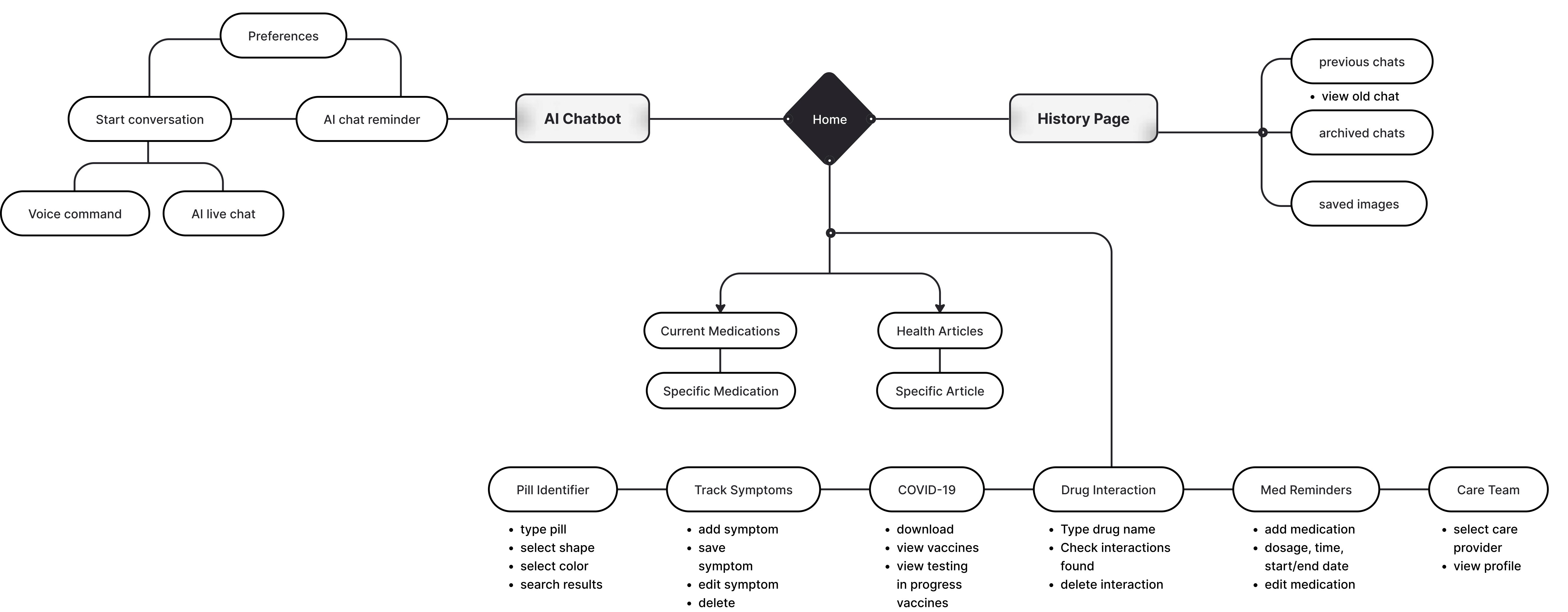
To identify opportunity areas, I created the user journey flow to visualize each target user group's perspective. This helped identify design priorities and map out future code structure at a high level.
Low Fidelity Wireframes
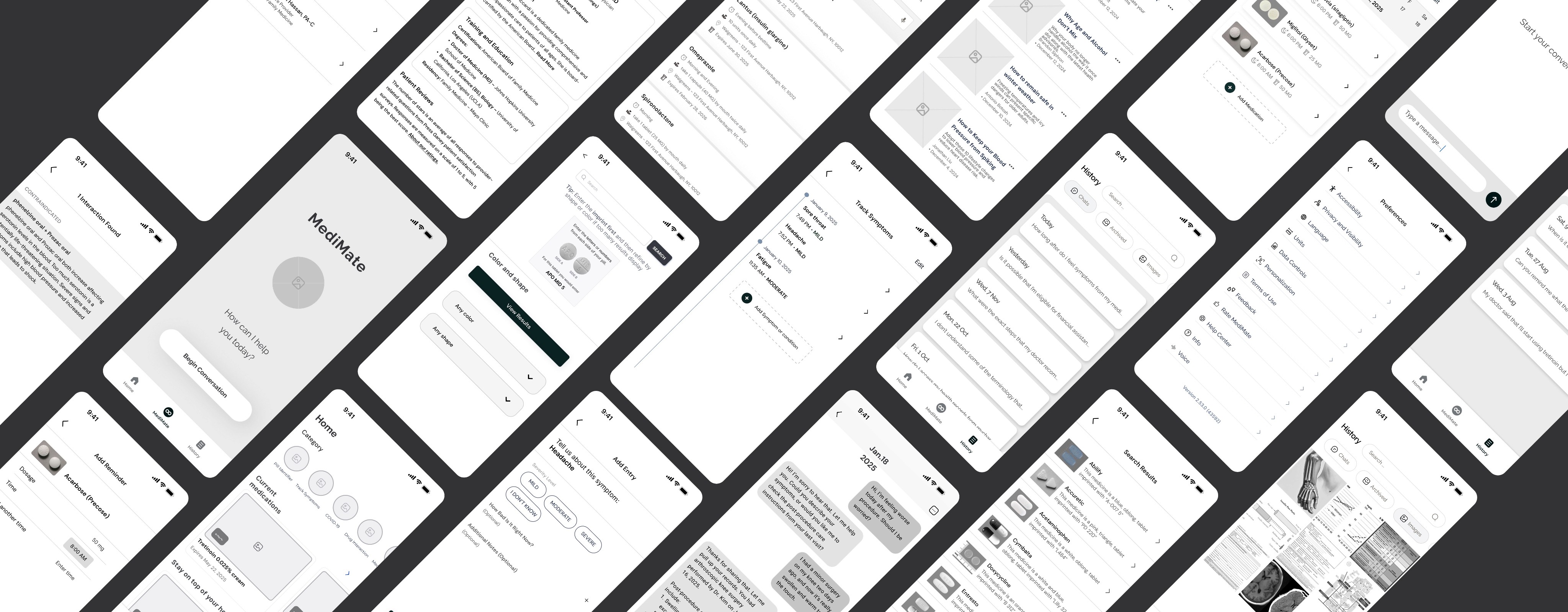
With the user flow mapped out, I created lo-fi wireframes that capture all main features for user testing.
Testing & Iteration
Answering "how intuitive are the interactions" with
usability testing & iterations.
We conducted small usability testing with 4 users to gauge if the flow of the app and the intended user interactions were intuitive. We also aimed to understand what the highest priority features and the nice to have features were with user feedback.
Hi-fi
Final Iterations & Hi-fi Wireframes
After implementing all the user testing feedback, I revised all hi-fi wireframes ensuring it provides enough information for users to complete tasks.
Before: Chatbot
Identified user concerns around limited chatbot functionality and lack of transparency around AI-generated responses
Evaluated UI issues, including overly cluttered, text-heavy input fields
After
Introduced voice-to-text and live AI interaction
Simplified text input fields to reduce cognitive load and improve readability
Integrated visual aids to support comprehension
After
Redesigned the pill identifier page with a more visual, intuitive interface
Implemented interactive icons for pill colors and shapes, enabling faster, at-a-glance selection
Added a visual imprint guide to help users locate and accurately identify pill markings
Before: Pill Page
Dropdown-based pill color and shape selection was found by users cumbersome and unintuitive
Need for more visual, image-based selection flow
Highlighted how missing instructional support led to user uncertainty
After
Added a calendar view so users can easily see which medications are scheduled for specific days
Introduced start and end date options to help users better manage prescription durations
Before: Medication Page
Absence of a calendar view, making it difficult for users to track medications by day
Missing start and end date controls when adding prescriptions
Design System
Building a design guide that sets the tone for healthcare support.
One key goal of MediMate is to create an environment where users feel supported, empowered, and confident in managing their health. Colors, typography, and visual elements are carefully selected to foster a sense of calmness and reliability, ensuring users feel welcomed and at ease.
Prototypes
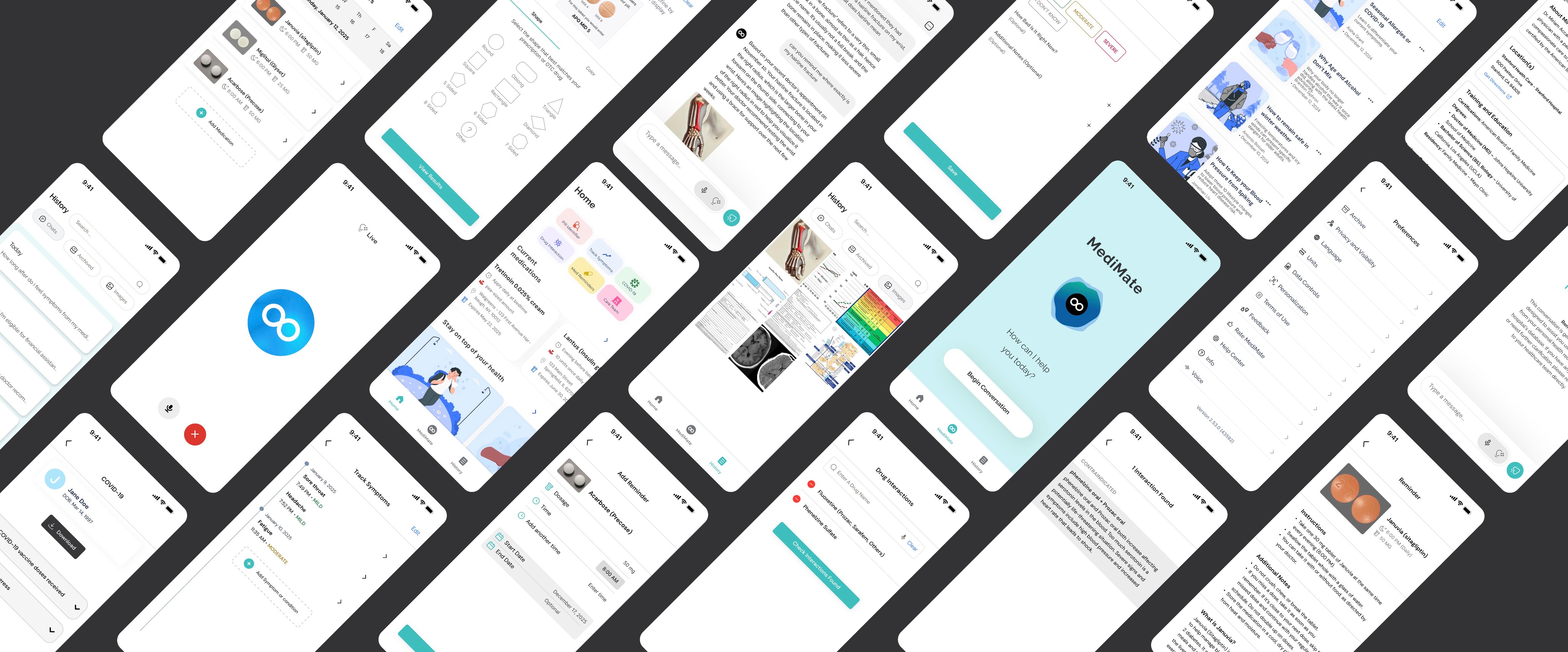
Our goal was to develop an AI-powered chatbot with assisted features integrated into existing electronic health records (EHRs), aiming to simplify the complexities patients face with post-appointment care. MediMate streamlines healthcare management, ensuring users remain informed, organized, and supported. Check out the final product below:
01 Typography
Fonts
Hierarchy
Aa
DM Sans
ABCDEFGHIJKLMNOPQRSTUVWXYZabcdefghijklmnopqrstuvwxyz 0123456789 ! @ # $ % ^ & * ( ) - _ + = [ ] { } ; : ' " , . / ?
Aa
Raleway
ABCDEFGHIJKLMNOPQRSTUVWXYZabcdefghijklmnopqrstuvwxyz 0123456789 ! @ # $ % ^ & * ( ) - _ + = [ ] { } ; : ' " , . / ?
Style
Font
Size
H1
H2
Body
Btn
Raleway Bold
DM Sans Bold
Raleway Medium
DM Sans Regular
DM Sans Regular
28px
17px
15px
14px
13px
02 Colors
CDF2F2
FFCDE3
E4F8EB
FAE9E9
72777A
F0F0FF
EAF2FF
3EC0C0
FBEEAE
0A7AFF
03 Components
Chats
Archived
Images
Exports
View Results
Select the shape that best matches your prescription or OTC drug
Round
Oblong
Square
Rectangle
Diamond
5 Sided
8 Sided
Other
6 Sided
7 Sided
Triangle
Select the color that best matches your prescription or OTC drug
White
Off White
Clear
Gray
Black
Tan
Brown
Red
Pink
Orange
Peach
Yellow
Green
Blue
Purple
Turquiose
Gold
Lavender
Multicolor
Add Medication
Home
MediMate
History
Type a message...
Shape
Color
Shape
Color
Listening...
Testing in progress
Testing in progress
Ordered by Dr. John Doe at Hospital XXX on Aug 15, 2022
03
The history page organizes past user interactions in a structured and accessible way.
Includes a searchable record of previous chatbot conversations, archived care summaries, and saved medical images.
Provides a sense of continuity, ensuring users can easily revisit and manage their healthcare information when needed.
05
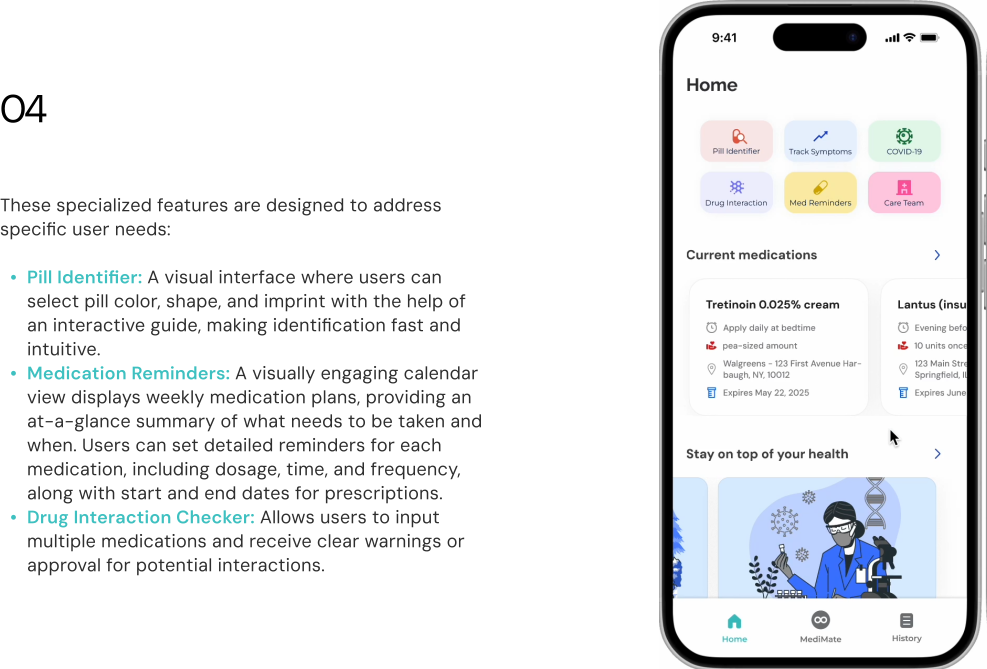
These specialized features are designed to address specific user needs:
COVID-19: The COVID-19 page provides users with a centralized view of their COVID-19 vaccination history and testing records.
Symptom Tracker: A dynamic tool that allows users to log, monitor, and manage their symptoms over time. Users can easily input details such as the type and severity with the option to add notes for additional context.
Care Team: Displays a detailed list of the user’s healthcare providers. Each entry includes detailed information about the provider, including location and past training and education.
01
The home page serves as the central hub for MediMate, providing quick access to optional features
Displays a list of the user’s prescribed medications with dosages, schedules, and expiration dates
Includes a health articles section covering topics such as chronic illness management, seasonal allergies, and general wellness advice
Reflecting on the Project
This project was my first experience leading product design, and while it was challenging, it was also incredibly fulfilling. As the lead, I encountered moments where team members had differing opinions on design choices. To address these, I relied on user research and feedback to ground decisions in data and user needs. By presenting insights and fostering collaboration, I was able to align the team and ensure the final product met user needs and future business goals
01
Vision vs Reality
The first design is never the final one. While I was initially proud of the first iteration, user testing underscored the critical role of continuous feedback and iteration in creating a successful product. Without these revisions, the final design wouldn’t have effectively met user needs.
The customer always comes first. Although designing based solely on personal preferences might be easier, embracing user-centered design allows me to craft solutions that truly address user needs and create meaningful impacts in their lives.
02
Data Justification
During parts of our project, there were times during which we felt that some of the data we collected may not have been representative of the entire population, but we still ensured that our design and research decisions were based on that particular data, also noting our limited sample sizes to qualify such decisions.
03
What Makes a Great Team
I'm grateful for my amazing team members and all the help we received from our professor that led to a great collaboration. The key reason is that we all had different strengths — design, engineering & health informatics, and we worked on building trust first. This made me realize once again how to have a successful team, you must first start to understand each other and their goals.
Reflections