Mental Sphere
MARCH 2023
Google UX Design Project
Designing an experience that is seamless, inclusive, and
captivating to support the care for users.
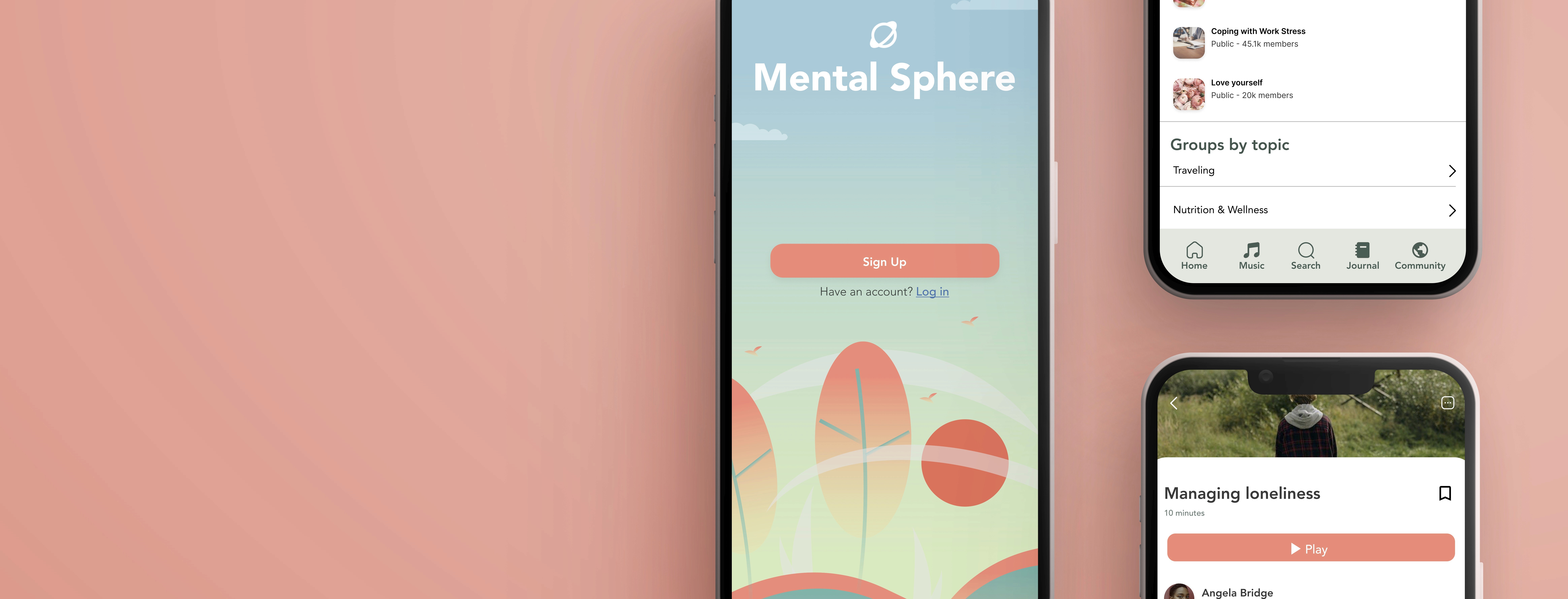
Mental Sphere is an app created to help users reconnect with their
inner self by accessing meditation guides and other healing practices.
Mental Sphere aims to positively affect users by providing them with
guided meditation exercises, support groups, their own journal,
ambient sounds, and more. The app wants to help users achieve a sense
of peace and tranquility while listening to beautiful tunes and guides.
As part of Google’s User Experience Designer Certification course,
I researched and designed Mental Sphere.
Mental Sphere
Role
UI/UX Design, User Research
Duration
Mar. 2023 - Jun. 2023
Tools
Miro, Figma, Google Sheets
Team
Solo Project
Overview
Problem
The lack of localization and international support in mobile applications hampers user engagement, prevents the promotion of mental well-being on a global scale. How can we use utilize technology to support the development of healthy habits?
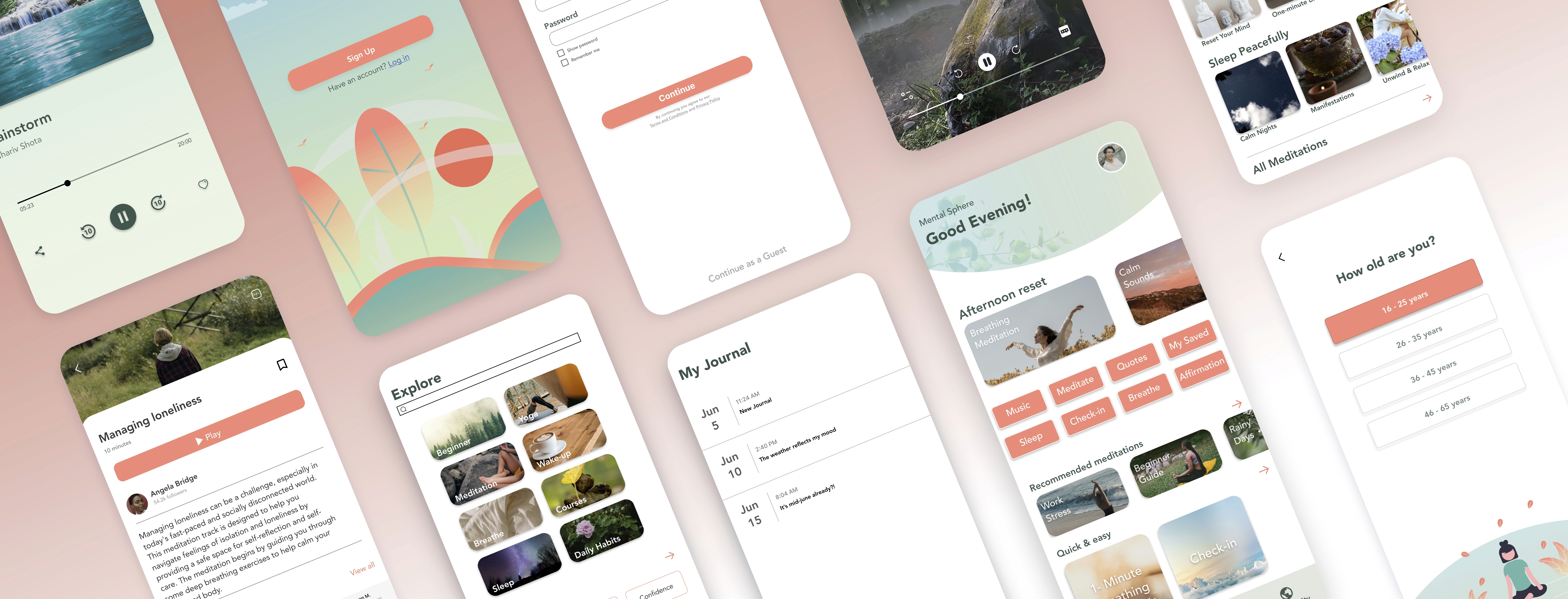
An interactive app that serves as a mental health hub. The platform will serve as a reliable support system, providing valuable information, exercises, and tools in multiple languages. With a global perspective, the application offers a diverse array of resources depending on the users region.
Solution
My Role
UX/UI Design, UX Research
Timeline
Mar. 2023 - Jun. 2023
Team
Solo Project
Tools
Figma, Miro, Google Sheets
Design Outcome


Find your Community
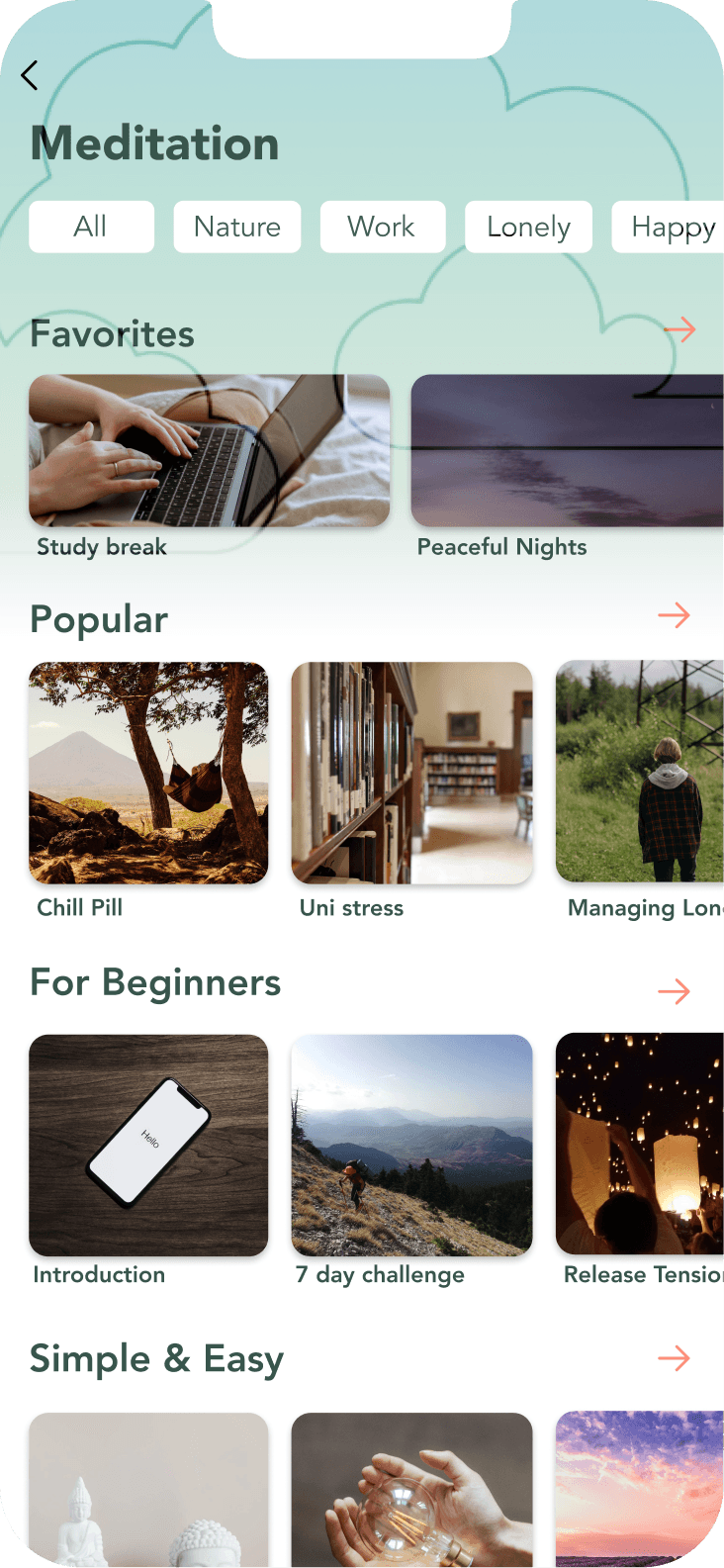
Users can choose from a variety of meditation exercises, each designed to address a specific topic such as work anxiety, sleep problems, focus, and relaxation.
Personalized Meditations
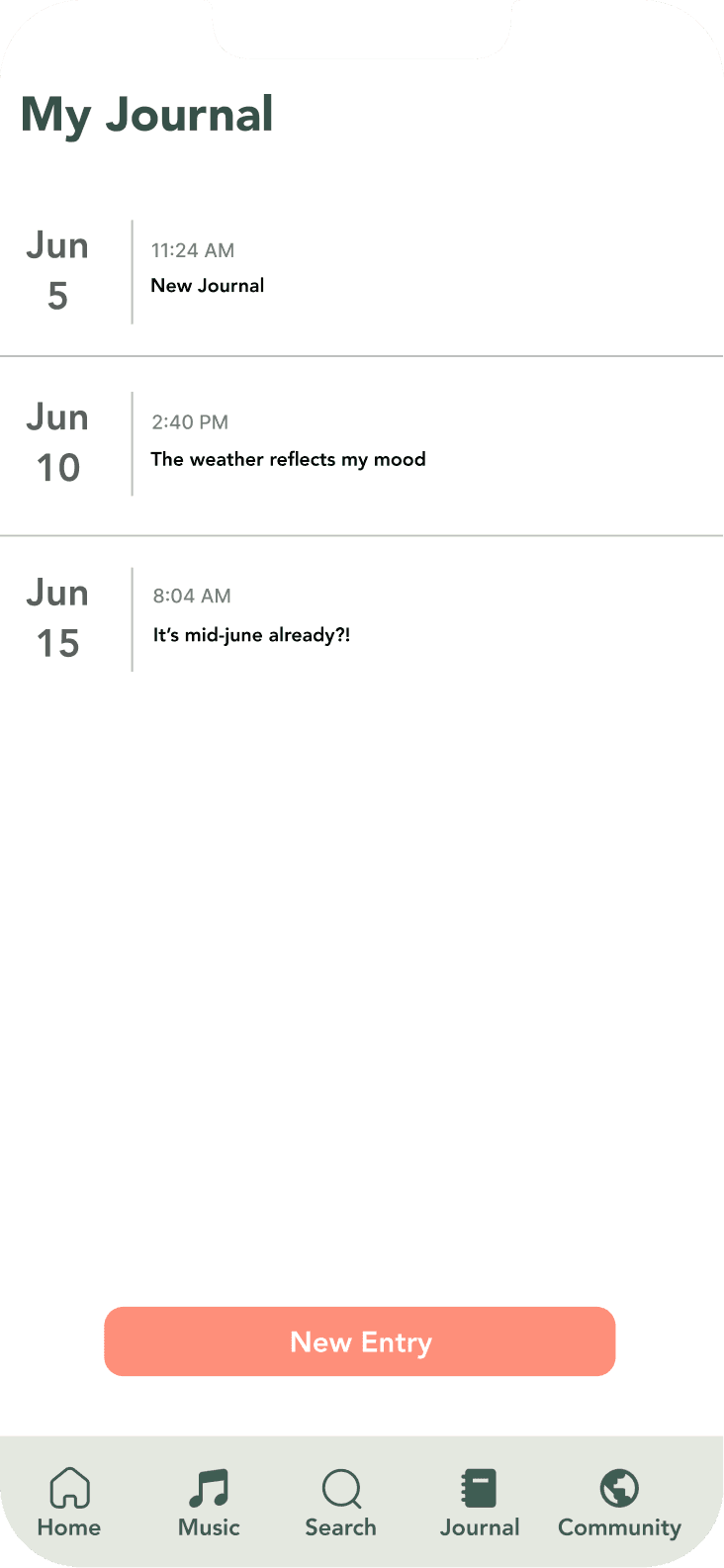
Journal Away
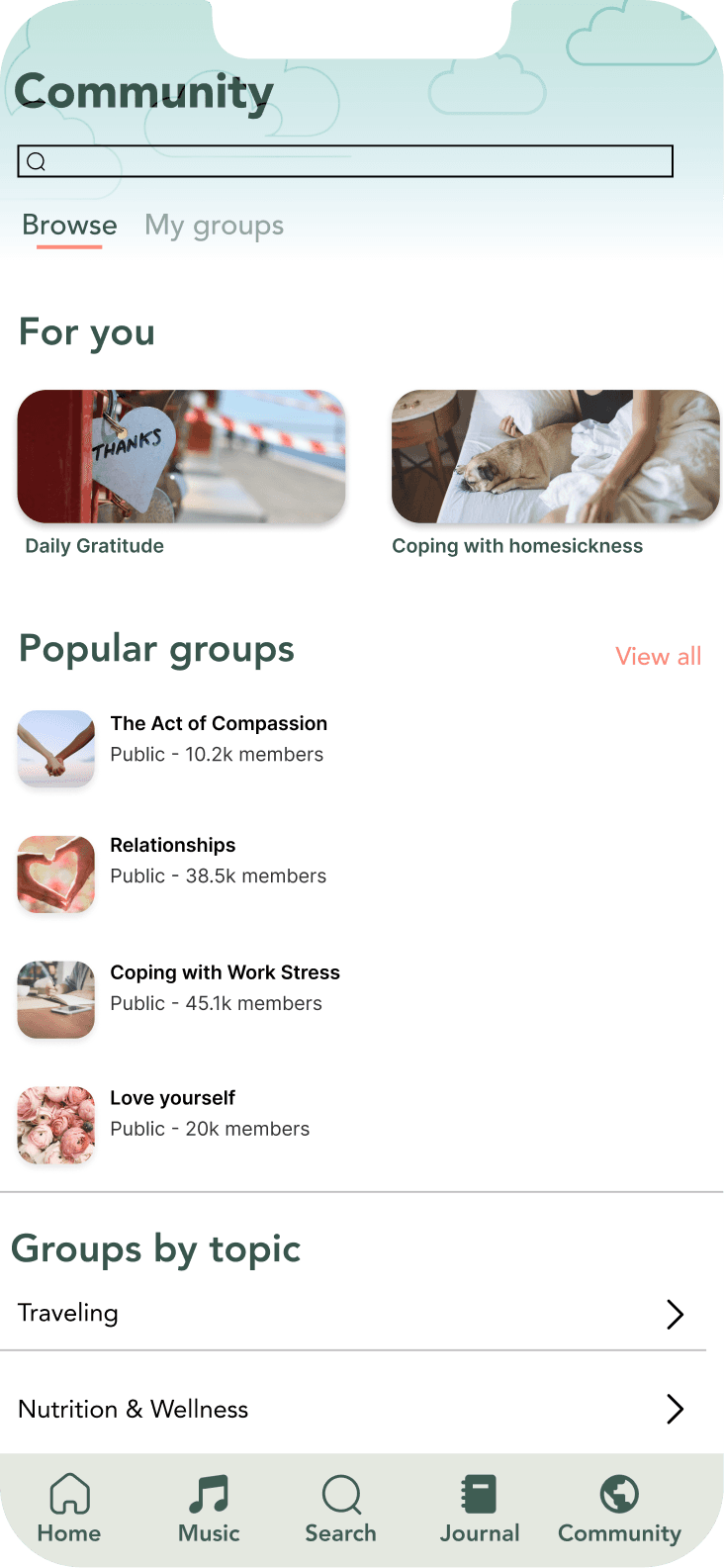
Users can create or join communities to talk about certain subjects, such as work and school stress, healing trauma, and more. The community page allows for creativity and connections towards other users in order to foster a healing community.
Features a journaling tool, where users can reflect on their day and record their thoughts, feelings, and experiences, which can help promote mindfulness.
The project delved into various methodologies, including affinity diagrams, personas, and competitive
analysis. For the development of Mental Sphere, my focus was on adopting a goal-directed design
approach. I started off with asking key questions, as I sought to gain a comprehensive understanding of
user needs and preferences.
‘What are the key barriers or challenges faced by users?’
‘What are the users' primary interest in mental health apps?’
‘What is the product and who is it for?’
‘What are the user preferences regarding UI design and navigation?’
‘Who can be seen as the biggest competitors?’
‘What meditations should I review to familiarize myself?’
RESEARCH
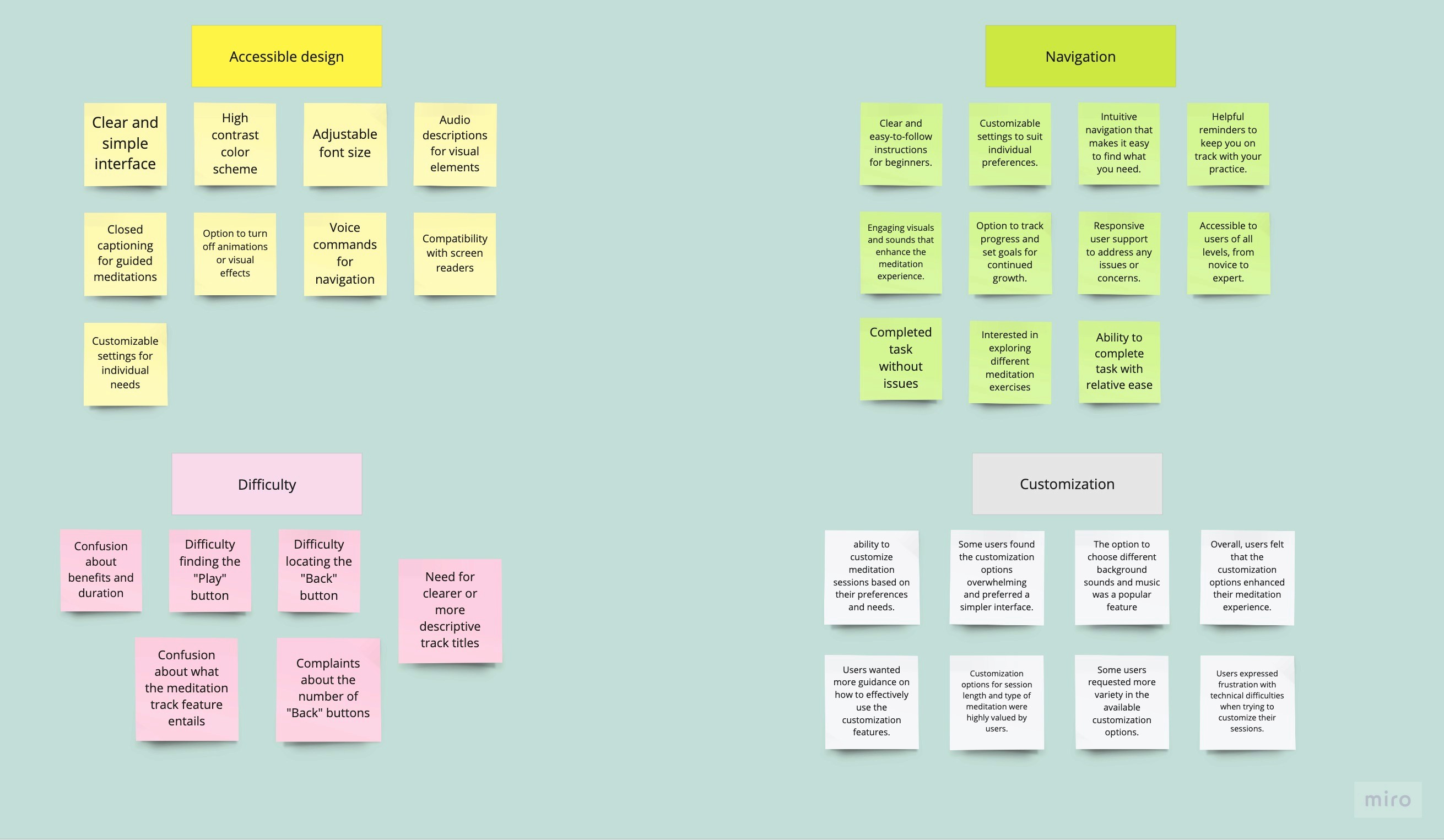
To begin the investigation, I conducted interviews to gain valuable insights into the experiences, needs, and preferences of the users. In addition, I created an affinity diagram to separate the research findings into groups to categorize the key goals for improvement.
Users prefer clear and accessible designs, with customization options for session length and specific meditations, while their preferences for visual and audio enhancements vary.
I interviewed 5 people through zoom, each with various ages, abilities, and backgrounds who had a hard time focusing and managing their time. I found that:
Users preferred having a clear and simple interface and accessible design such as closed captions, adjustable font size, or various languages
Some people need engaging visuals and sounds that enhance the meditation experience; others wanted no visual effects
Some users had confusion about what the meditation track feature entails; requested needing more information about specific tracks
Customization options for session length and specific meditations were highly valued by users
Interviews & Affinity Diagram
User Journey
This experience map visualizes the ideal user experience, specifically for our user persona, Minh. Minh Nguyen is an international student studying abroad in the U.S. This map will serve as our guide as we design the product, particularly the first prototype.
Users prefer clear and accessible designs, with customization options for session length and specific meditations, while the users preferences for visual and audio enhancements vary.
Wysa

Balance

Bird Alone

Breeze

Design
Personas
Competitive Analysis
Therefore, I aim to develop a global mental wellness app that can cater to the diverse needs of individuals worldwide, and provide personalized recommendations based on their unique preferences and circumstances.
From the analysis, I learned that:
Opportunities to increase user engagement by adding social features that allow users to connect with others who have similar experiences or interests.
Enhance the user experience by adding more interactive features, such as quizzes or games, to help users engage with the app and learn about mental health.
Integration with Apple Health and other apps, making it easy for users to incorporate meditation into their daily routines
Engaging and interactive app design, with a focus on music and storytelling

Minh
International College Student
22 | M.S student in Computer Science
User Bio
Objectives
Pain Points
Minh is a 22-year-old international student from Vietnam who is studying for a Master's degree in Computer Science in Seattle. He's away from his family and familiar surroundings, and often feels stressed and anxious about his studies and adapting to a new culture. He's also facing pressure from social media to always be connected and on top of his game. He's looking for a tool that can help him manage his stress and anxiety, and provide him with the support he needs to succeed in a new country.
Stress from adapting to a new country and culture
pressure to perform well in school
stress from social media
Reduce exam-related stress and anxiety
improve mental well-being
connect with a supportive community
Ideation
Stress from adapting to a new country and culture pressure to perform well in school stress from social media
After thorough deliberation, I determined the essential core functionalities that will serve as the building blocks of the app:
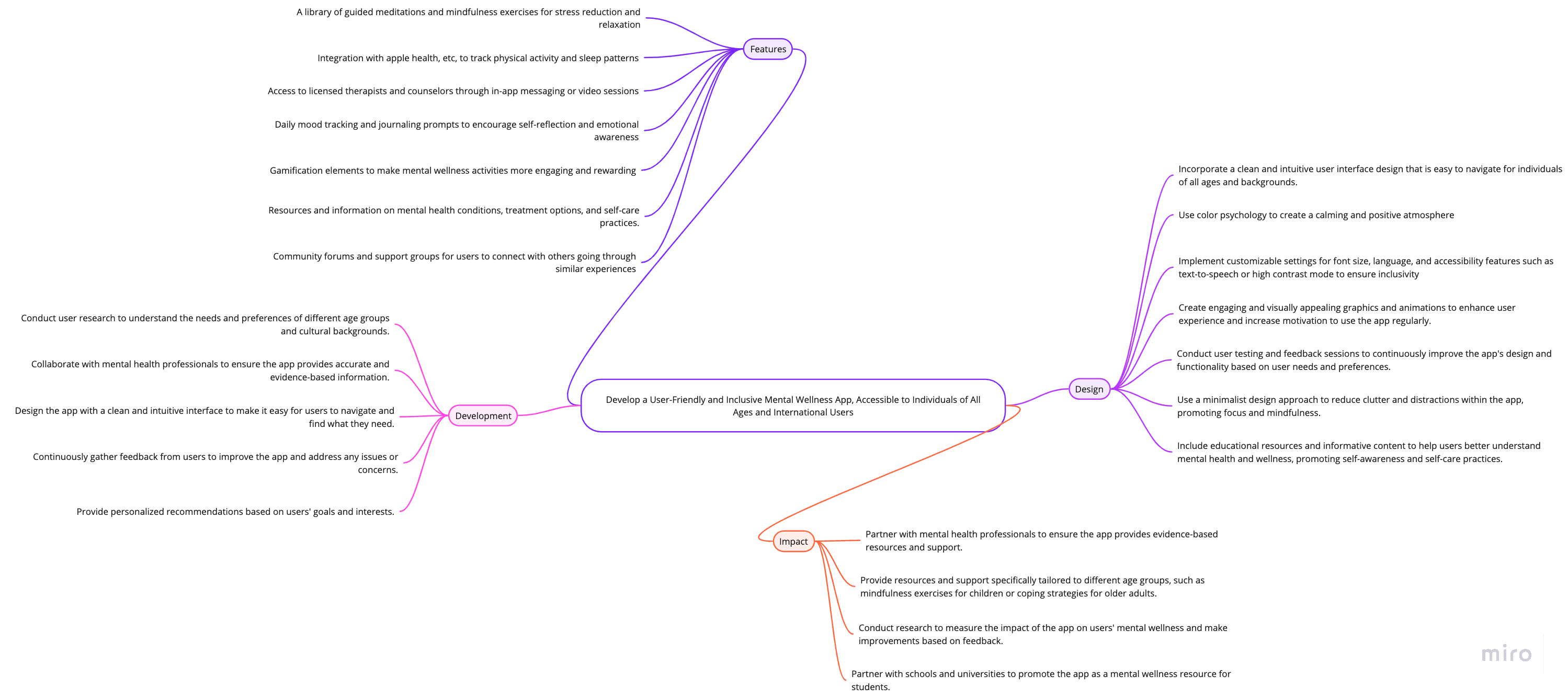
Community forums and support groups for users to connect with others going through similar experiences

Implement customizable settings for font size, language, text-to-speech, or high contrast mode to ensure inclusivity

A library of guided meditations and mindfulness exercises for stress reduction and relaxation

Gamification elements to make mental wellness activities more engaging and rewarding

Wireframes
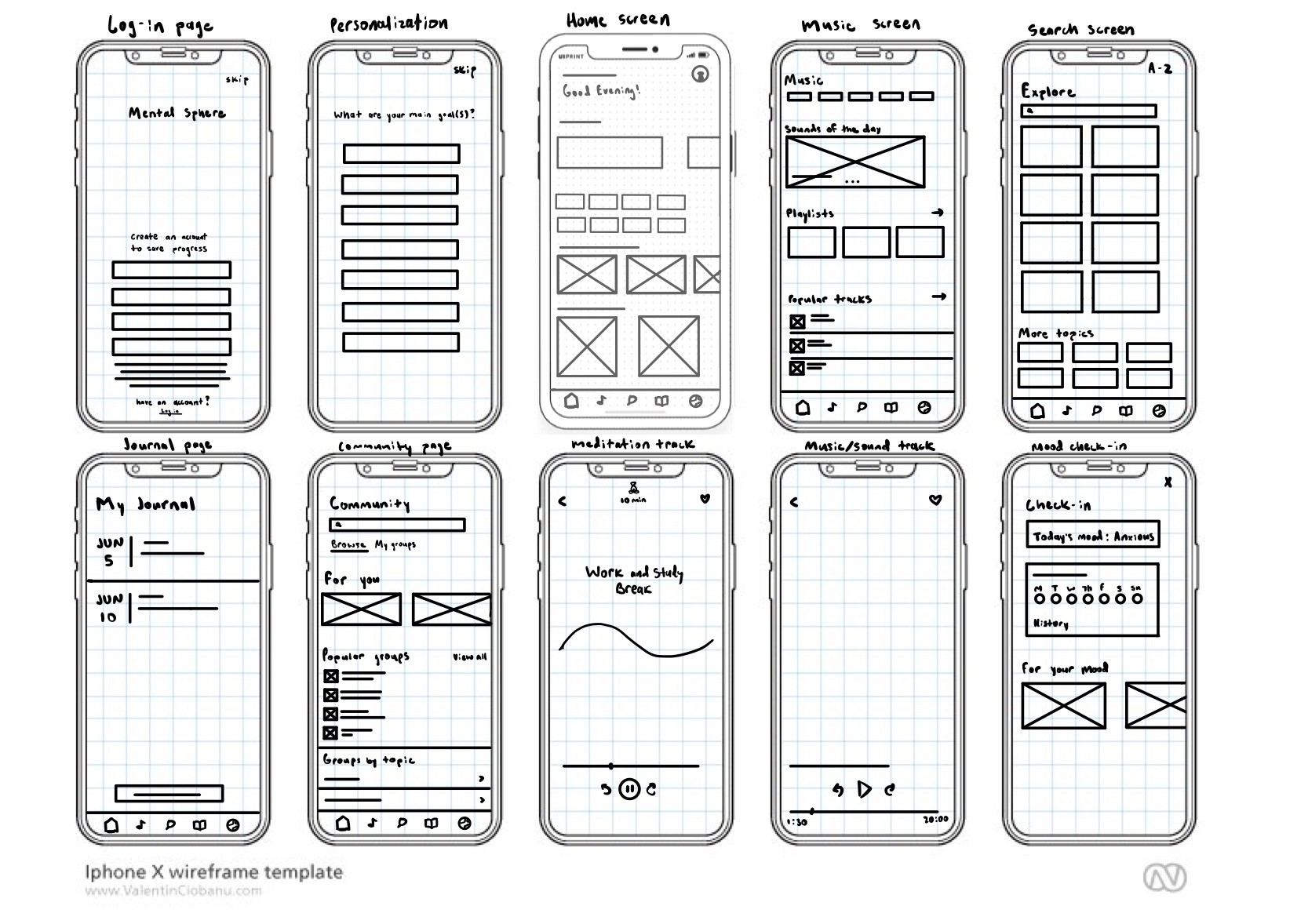
I drew out wireframes of the main pages on my iPad using some of the features in ideation phase
User Feedback
Following the creation of my prototype using low fidelity wireframes, I proceeded to present my prototype to a group of five participants, aiming to gather substantial feedback that would be instrumental for my future design iterations.
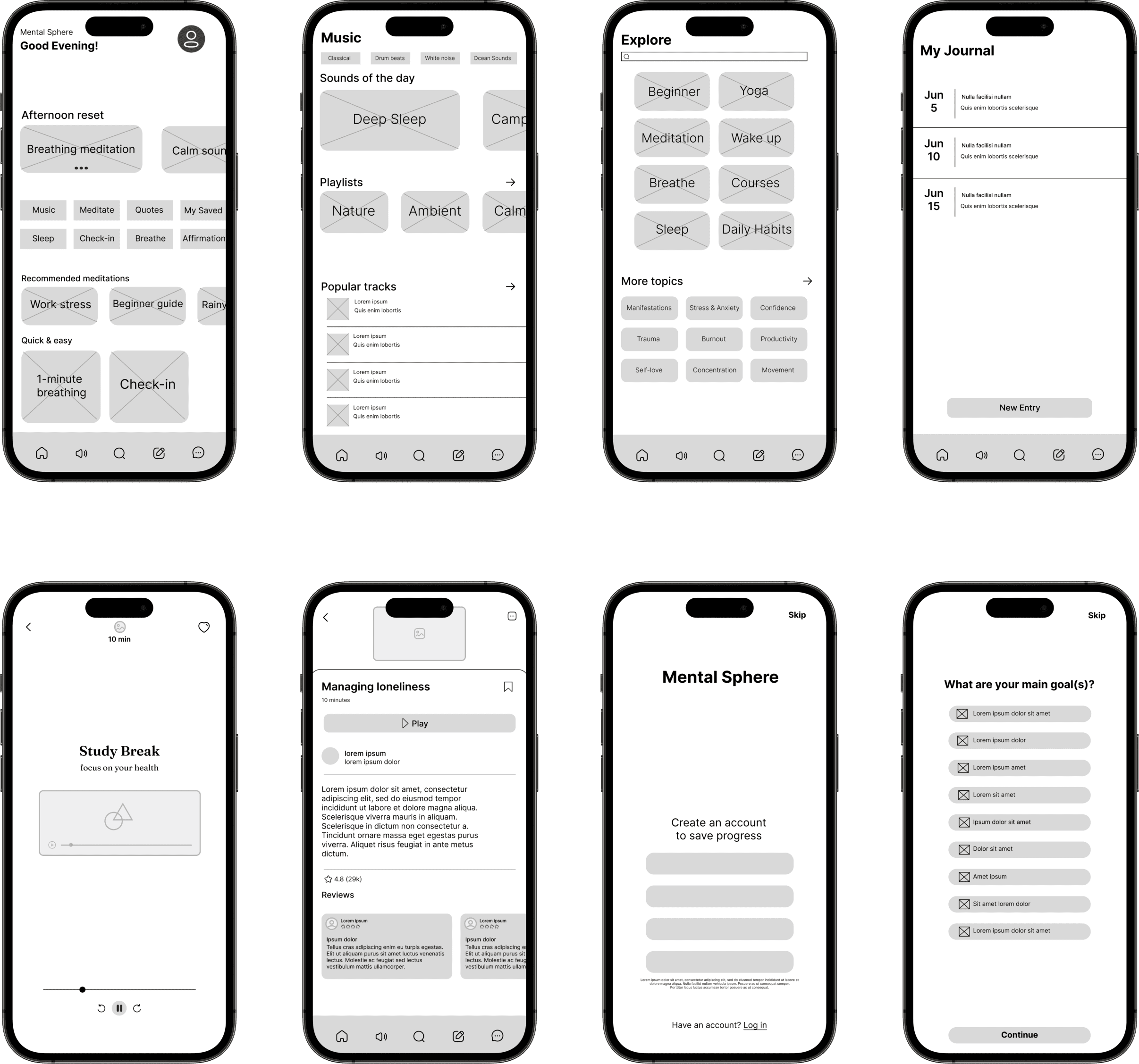
I created the following wireframes on figma for potential users to review and provide feedback:
Improvements
There were two major improvements in my design
After receiving feedback from six peers, I dedicated a week to constantly refining my design, leading to significant improvements:
10 min
Managing loneliness
you are loved
20:00
05:23
20:00
05:23
Rainstorm

Captions and Soundscape Widgets
Based off user feedback, I included captions for for improved accessibility and inclusivity.
Allow users to customize ambient sounds or nature-inspired audio in the meditation track

Easier Navigation
a simplified home structure with clear and concise labels, allowing users to easily find and access different sections of the app
I made some changes to the home page's design to make it easier to read and focused on showing users the most important information they need.
Based on user feedback, the main page felt very clustered and overwhelming


Breathing meditation
Afternoon reset
Calm soun
Music
Meditate
Quotes
My Saved
Sleep
Check-in
Breathe
Affirmation
Recommended meditations
Quick & easy
Work stress
Beginner guide
Rainy
1-minute breathing
Check-in
Good Evening!
Mental Sphere
Breathing meditation
Calming Sounds
Afternoon reset
Recommended meditations
Relax
Work stress
Beginner guide
Rainy
1-minute breathing
Good Evening!
Mental Sphere
Music
Meditate
Quotes
Sleep
Check-in
Breathe
Lack of localization and international support
To address this challenge, I implemented a localization feature within the Mental Sphere app. This feature allows users to select their preferred language and customize their app experience accordingly. Additionally, I incorporated international support by researching and incorporating meditation practices and healing techniques from various cultures around the world. This ensures that users from different countries and backgrounds can access content that resonates with their cultural preferences, promoting a more inclusive and personalized experience.
Inclusivity
Through extensive user research and testing, I ensured that the app's navigation and features are easily understandable and accessible to users of all ages. I also paid special attention to inclusive design principles, considering the needs of users with disabilities and incorporating accessibility features such as adjustable font sizes, color contrast options, and voice-guided navigation. By prioritizing user feedback and continuously refining the app's design, I aimed to provide an inclusive and enjoyable experience for all users.
Time Constraints
Users can choose from quick 5-minute sessions for busy schedules or longer sessions for a more immersive experience. To promote healthy habits, I incorporated reminders and notifications to encourage users to set aside regular time for self-care and meditation. Additionally, the app includes features such as a personal journal, progress tracking, and a community support group to help users stay motivated and engaged
Staying focused
Designing the interface with a clean and uncluttered layout was crucial in minimizing distractions and creating a visually calming environment. I opted for a minimalist design approach, using ample white space, a simple, intuitive navigation system, and a three-toned green, blue, and coral color scheme. This approach eliminates unnecessary visual noise and allows users to focus their attention on the content that matters most - the features
Challenges
Download App
Task Lists
Search for mental health apps
Select mental sphere
Compare different apps


Anxious
"Is the app free to use?"
• Provide a clear and concise explanation of the app's features and how it can benefit users to encourage more downloads
• Offer a free trial period to allow users to test the app before committing to a purchase
• Consider offering a discount or incentive for users who refer friends to download the app
Create Profile
Task Lists
Enter personal information
Select interests and preferences to customize

Curious
“Will my personal info be kept private?”
• Simplify the profile creation process to make it quicker and more intuitive for users
• Allow users to choose what information to share on their profiles to increase privacy and security
Explore Features
Task Lists
Browse the different features
Learn about features

Confused
“The page is overwhelming”
• Simplify main pages so users don’t get overwhelmed
• Consider gamifying the app to make it more engaging and encourage users to explore more features.
Join Support Group
Task Lists
Search for a support group for international users
Participate in discussions

Relieved
“There’s a group for students like me!”
• Offer support groups in multiple languages to cater to a diverse user base
• Provide moderators or facilitators who are experienced in dealing with issues specific to international users
• Offer live sessions in addition to message boards to allow for real-time interactions and support
Select Exercise
Task Lists
Select a guided meditation exercise
Follow the instructions provided from exercise

Satisfied
"How often should I participate in guided meditation exercises?"
• Offer different lengths of guided meditations
• Offer personalized recommendations for exercises and meditations based on the user's profile and preferences
• Consider integrating a feature that allows users to track their progress and set goals for regular meditation practice


Clear and Intuitive Navigation
Participants expressed a preference for streamlined and easily accessible menus, buttons, and navigation elements, enabling effortless exploration and seamless interaction with the interface.
Customization of Features
Participants expressed a desire for flexibility and personalization options that would enable them to tailor the product to their specific needs and enhance their overall satisfaction
Clarity of Information
Participants emphasized the need for well-structured content, legible typography, and a visually appealing interface
Creating Inclusive Design
Participants highlighted the importance of considering accessibility features such as text-to-speech capabilities, multilingual options, colorblind friendly colors, and more
SCREENS + INTERACTION DESIGN
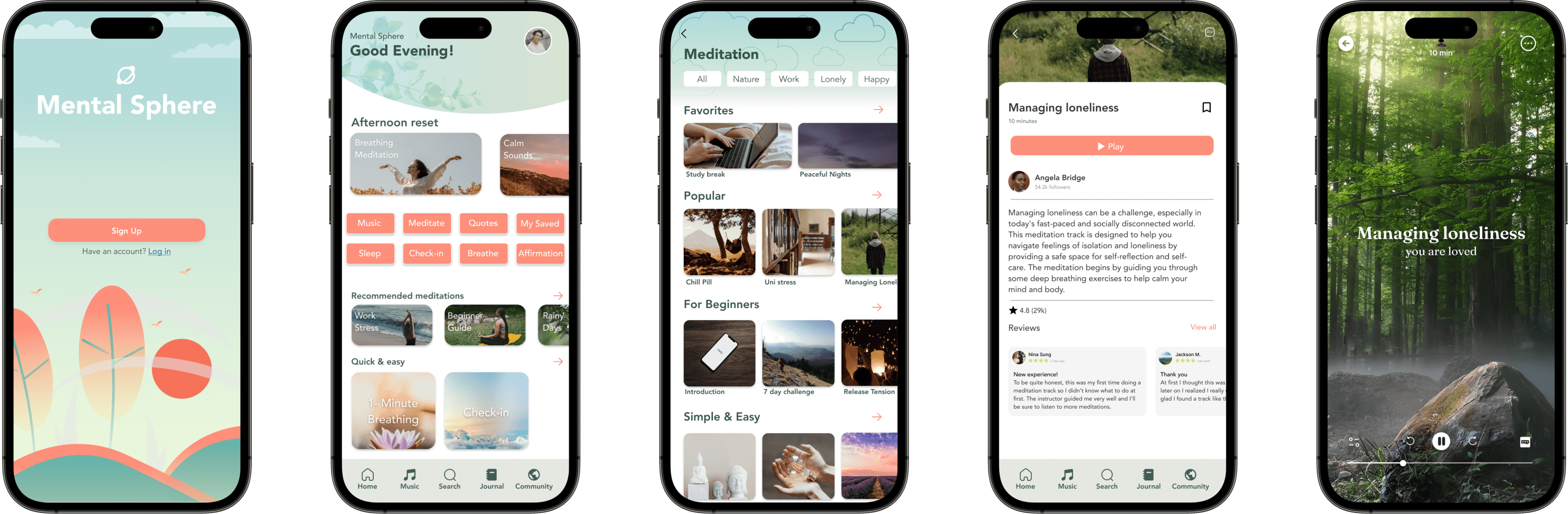
Final Product
During my first UX case study project, I had the opportunity to design a mental wellness app using a goal-directed design approach as part of the Google UX course. This approach focused on understanding users' goals and designing a solution that aligns with those objectives. Here are my key takeaways and reflections from this project:
🌟 Engaging Users Actively Shines The Missing Areas
🌟 The Power of Prototyping and User Testing
🌟 Balancing Simplicity and Complexity
🌟 Seeking External Perspectives and Feedback
This marked my first endeavor encompassing comprehensive and continuous primary qualitative user research. Numerous assumptions I had previously held were debunked by actual users, underscoring the importance of prioritizing user advocacy.
Translating my ideas into tangible prototypes allowed me to visualize the app's functionality and interactions, enabling me to identify usability issues early on. Conducting user tests with these prototypes proved invaluable, as it provided me with real-world insights and helped me validate or pivot my design decisions. Iterating and refining the prototypes based on user feedback not only improved the app's usability but also instilled confidence in the final design solution.
While I worked alone on the project, I actively sought opportunities to gather feedback from potential users, friends, and mentors. This external input helped me identify blind spots and gain fresh insights into my design solutions. Even though I was the sole contributor to the project, I recognized the value of collaboration and sought feedback as a means of enriching my design decisions and improving the overall user experience.
I learned the importance of simplifying the user interface and making the app intuitive for users with varying levels of technical expertise. However, I also realized the need to incorporate features that catered to more specific and nuanced mental health needs. This delicate balance ensured that the app remained accessible to a wide range of users while addressing their unique requirements.
Typography
Avenir
The quick brown fox jumps over the lazy dog
The quick brown fox jumps over the lazy dog
Colors
Components
Grid + Spacing
#BBC4B8
#E4E8E0
#244622
#FFFFFF
#76886D
#fe8f7a
#578437
#3f5d53
Logo
Mental Sphere

Button
Button Style
Multiple Choice
Icons
8 columns
Type: stretch
Gutter: 16
Margin: 10
Background Screen
Continue
Add Text
Add Text
Add Text
Add Text
Add Text
Add Text
Add Text
Add Text


#D6EAC0
#56ADF4
The Style Tile
Reflections & takeaways